Google 캘린더에서 약속을 예약하려면 이메일 확인 필요합니다.
▶ Google Workspace 캘린더 매뉴얼 : https://goo.gl/MXe424
▶ Google Workspace 캘린더 업데이트
Google 캘린더 약속 예약시 이메일 확인
Google 캘린더에서 약속 예약을 사용할 때 사용자가 약속을 예약하기 전에 이메일을 확인하도록 선택할 수 있습니다. 이 옵션을 활성화하면 사용자가 Google 계정에 로그인하거나 PIN 코드를 사용하여 이메일 주소의 유효성을 확인해야 예약을 완료할 수 있습니다.
이 설정은 기본적으로 해제되어 있으며 “Sticky”되어 있습니다. 즉, 설정을 켜거나 끌 경우 새 약속 예약 시리즈에 대한 구성에만 저장됩니다. 이 기능이 잠재적으로 악의적인 행위자로부터 사용자를 보호할 수 있습니다.
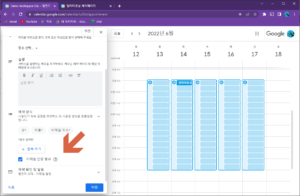
Google 캘린더 약속 예약시 이메일 확인 1
Availability
- Available to Google Workspace Business Standard, Business Plus, Enterprise Standard, Enterprise Plus, Education Fundamentals, Education Standard, Education Plus, the Teaching and Learning Upgrade, and Nonprofits customers
- Not available to Google Workspace Essentials, Business Starter, Frontline, as well as legacy G Suite Basic and Business customers