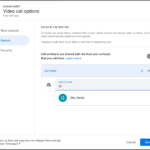
Google 캘린더의 미팅 전에 호스트 제어 설정 및 공동 호스트 할당할 수 있습니다.
▶ Google Workspace 캘린더 매뉴얼 : https://goo.gl/MXe424
▶ Google Workspace 캘린더 업데이트
Google 캘린더 미팅전 호스트 제어 설정
Google 캘린더에서 미리 Google Meet 브레이크아웃 룸을 설정하는 것 외에도 미팅 주최자는 다음과 같은 작업을 수행할 수 있습니다.
- 대화 잠금, 현재 잠금 등과 같은 회의 안전 기능을 설정하거나 해제합니다.
- 회의 전에 공동 개최자를 지정합니다.
미팅 호스트가 추가 설정을 미리 구성하고 공동 호스트를 할당할 수 있도록 함으로써 미팅이 보다 원활하게 진행될 수 있습니다..
최종 사용자: Google 캘린더에서 미팅을 예약할 때 호스트 제어 및 공동 호스트 옵션을 구성하려면 “Google Meet 화상 회의 추가” > “비디오 통화 옵션”(기어 아이콘) > 호스트 제어 또는 공동 호스트를 선택합니다.

Google 캘린더 미팅전 호스트 제어 설정
Availability
Moderation Settings
- Available to all Google Workspace customers, as well as legacy G Suite Basic and Business customers.
- Available to users with a personal Google account
Co-host settings
- Available to Google Workspace Essentials, Enterprise Essentials, Enterprise Standard, Enterprise Plus, Business Standard, Business Plus, Education Fundamentals, Education Standard, Education Plus, and Teaching and Learning Upgrade customers
- Not available to Google Workspace Business Starter, Frontline, and Nonprofits, as well as legacy G Suite Basic and Business customers