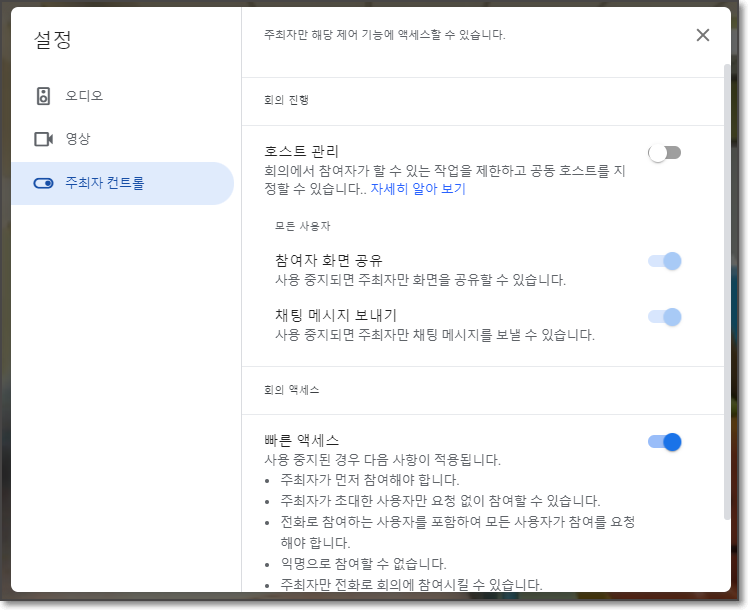
구글 미트 빠른 액세스 호스트 관리를 통하여 공동주최자 관리를 쉽게 할 수 있습니다.
▶ Google Meet 매뉴얼 : https://bit.ly/3eeGAmv
▶ Google Meet(CSC-M17) 업데이트
구글 미트 빠른 액세스 호스트 관리
최근, 우리는 미팅 안전 기능의 확장과 구글 Meet에서 최대 25개의 공동 주최자를 추가할 수 있는 능력을 발표했습니다. 이제 관리자가 도메인에서 호스트 관리 및 빠른 액세스 기능을 기본적으로 켜거나 끌지 여부를 구성할 수 있는 두 가지 새로운 컨트롤을 추가했습니다.
구글 미트 빠른 액세스 호스트 관리
두 경우 모두 기능이 기본적으로 OFF로 설정된 경우, 미팅 호스트는 미팅 내부에서 빠른 액세스 또는 호스트 관리를 수동으로 설정할 수 있습니다. 각 기능의 기본 관리 설정에 대한 자세한 내용은 아래를 참조하십시오.
- 호스트 관리:안전 설정 및 호스트 관리 충족 관리에 대한 자세한 내용은 도움말 센터를 참조하십시오.
- 빠른 액세스: 빠른 액세스 설정 관리에 대한 자세한 내용을 보려면 도움말 센터를 방문하십시오.
- 최종 사용자: 관리자가 활성화하면 도움말 센터를 사용하여 Google Meet 비디오 통화에서 사용자를 추가하거나 제거하고 호스트 권한을 할당하는 방법에 대해 자세히 알아보십시오.
사용가능
Host management is:
- OFF by default for: Google Workspace Business Starter, Business Basic, Business Standard, Business Plus, Enterprise Essentials, Enterprise Standard, Enterprise Plus, Essentials, and Non-profits customers.
- ON by default for: Google Workspace for Google Workspace for Education Fundamentals, Education Standard, Education Plus, the Teaching and Learning upgrade, and Frontline customers
- Not available to Google Workspace Individual customers or users with personal Google Accounts.
Quick access is:
- ON by default for all Google Workspace customers, as well as G Suite Basic and Business customers.
- Not available to Google Workspace Individual customers or users with personal Google Accounts.