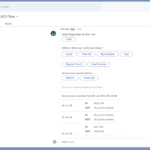
Google Meet 회의의 회의 녹음, 회의록 및 메모 자동화를 지원합니다
▶ Google Meet 매뉴얼 : https://bit.ly/googlemeet-manual
▶ Google Meet(CSC-M17) 업데이트 https://bit.ly/google-meet-update
▶2024 Google Workspace 스마트폰에서 Meet 사용하기
Google Meet 회의녹음 메모 자동화 지원
관리자는 이제 새로 생성된 회의에 대해 회의 녹음, 회의록 및 “나 대신 메모”*를 기본적으로 켜도록 구성할 수 있는 옵션이 있습니다. 회의 주최자 및 공동 주최자는 캘린더 초대장에서 이러한 설정을 편집할 수 있을 뿐만 아니라 회의 중에 이러한 아티팩트를 끌 수 있습니다.
이러한 설정이 수동 개입에 의존하지 않고 영업 전화 또는 타운홀 미팅과 같은 특정 회의 또는 일련의 회의에 대해 아티팩트가 생성되도록 하는 데 도움이 되기를 바랍니다. 이러한 회의 아티팩트가 켜져 있으면 참석자는 그린룸에 참여할 때와 회의에 참여할 때 알림을 받게 됩니다.
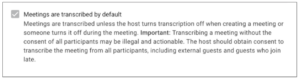
Google Meet 회의녹음 메모 자동화 지원
앱 > Google Workspace > Google Meet > Meet 비디오 설정 > 자동 전사
앱 > Google Workspace > Google Meet > Meet 비디오 설정 > 자동 녹음
앱 > Google Workspace > Google Meet > Meet 비디오 설정 > 자동 메모
*”나 대신 메모”는 Gemini 추가 기능이 필요합니다.
관리자: 이러한 설정은 도메인, OU 또는 그룹 수준에서 적용할 수 있습니다.
Availability
- Available to Google Workspace
- Business Standard and Plus
- Enterprise Essentials, Enterprise Essentials Plus
- Enterprise Standard and Plus
- Education Plus, and the Teaching and Learning Upgrade
- “Take notes for me” requires a Gemini Business, Enterprise, Education, Education Premium, or AI Meetings & Messages add-on.