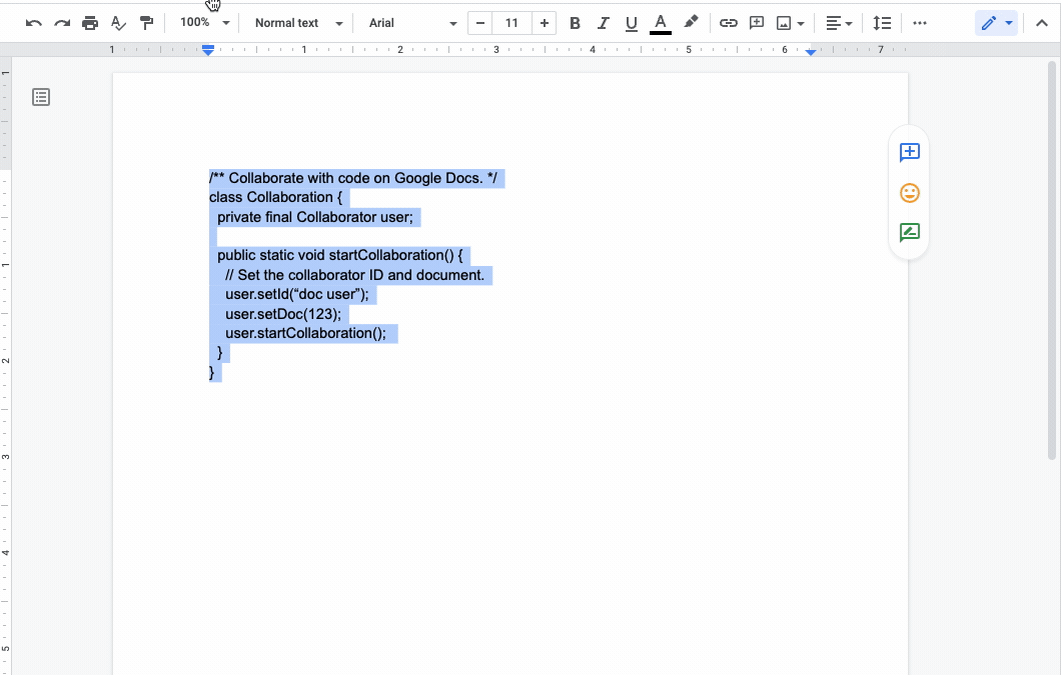
Google 문서에서 코드를 쉽게 포맷하고 표시할 수 있습니다.
▶ Google 문서 매뉴얼 : https://goo.gl/LmsM5a
▶ Google 문서 매뉴얼(CSC-M06) 업데이트
Google 문서에서 코드 포맷과 표시를 쉽게하기
현재 구글 문서에서 작업할 때 코드를 제시하려는 공동작업자는 문서에 코드를 붙여넣은 다음 구문을 강조 표시하여 스타일을 수동으로 적용해야 합니다.
코드 블록을 사용하여 문서에서 코드를 포맷하고 표시할 수 있도록 하여 이 프로세스를 훨씬 더 쉽게 만드는 새로운 스마트 캔버스 기능을 추가합니다.
Google 문서에서 코드 포맷과 표시를 쉽게하기
이 기능을 사용하면 업계 표준으로 코드를 시각화할 수 있으므로 코드를 훨씬 쉽게 읽을 수 있고 협업할 수 있습니다.
최종 사용자: 문서에서 코드를 포맷하고 표시하려면 삽입 > 빌딩 블록 > 코드 블록 > 프로그래밍 언어를 선택하거나 @ > 코드 블록 > 프로그래밍 언어를 검색합니다. Google 문서에 스마트 칩을 삽입하고 블록을 구성하는 방법에 대해 자세히 알아보려면 도움말 센터를 방문하십시오.
Availability
- Available to Google Workspace Business Standard, Business Plus, Enterprise Standard, Enterprise Plus, Education Standard, Education Plus customers and Nonprofits
- Not available to Google Workspace Essentials, Business Starter, Enterprise Essentials, Education Fundamentals, the Teaching and Learning Upgrade, Frontline, as well as legacy G Suite Basic and Business customers
- Not available to users with personal Google Accounts
내용 : https://workspaceupdates.googleblog.com/2022/12/format-display-code-google-docs.html