“Take for me”, 녹음된 캡션, 회의 녹취록을 위한 선호 언어 설정 업데이트가 되었습니다.
▶ Google Meet 매뉴얼 : https://bit.ly/googlemeet-manual
▶ Google Meet 업데이트 https://bit.ly/google-meet-update
▶2024 Google Workspace 스마트폰에서 Meet 사용하기
회의에 관련한 선호 언어 설정 업데이트
최근 “노트 작성”, 녹음된 캡션, 회의 녹취록에 대한 추가 언어 지원을 발표했습니다. 이제 이러한 기능에 대해 선호하는 언어를 설정할 수 있습니다:
- 캘린더 초대장에서. 선호하는 언어가 시리즈의 모든 회의에 적용됩니다.
- 안드로이드 및 iOS 기기에서 Google Meet를 사용할 때 회의 중.
캘린더 초대장에서 선호하는 언어 선택하기
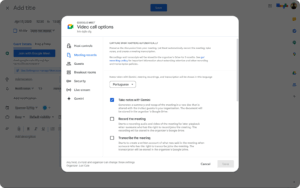
회의에 관련한 선호 언어 설정 업데이트
녹음된 캡션이나 회의 캡션에 대한 관리자 제어는 없습니다.
Availability
“Take notes for me” is available for Google Workspace:
- Business Standard and Plus
- Enterprise Standard and Plus
- Also available with the Gemini Education Premium add-on
- Anyone who previously purchased the Gemini Enterprise* and AI Meetings & Messaging* add-ons will also receive this feature.
*As of January 15, 2025, we’re no longer offering the Gemini Enterprise add-ons for sale. Please refer to this announcement for more details.
Transcripts are available for Google Workspace:
- Business Standard and Plus
- Enterprise Starter, Standard, and Plus
- Education Plus and the Teaching & Learning Add-on
- Workspace Individual Subscribers
Captions included in a meeting recording are available for Google Workspace:
- Business Plus and Standard
- Education Plus for users with a “Staff” or “Student” license, and the Teaching & Learning add-on
- Enterprise Essentials
- Enterprise Starter, Standard, and Plus
- Workspace Individual Subscribers
- Google One subscribers with 2 TB or more storage space
.gif "Google Meet 하드웨어 장치에서 클라이언트 측 암호화된 회의에 참여")