Google Workspace에서 Gemini를 통해 더 많은 도구에 연결하세요.
▶ Google Workspace 관리자 매뉴얼 :
https://bit.ly/googleworkspace-admin-manual
▶ Google Workspace 관리자 업데이트 :
https://bit.ly/googleworkspace-admin-update
Google Gemini MCP 다양한 도구 연결
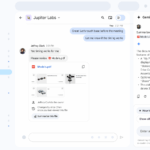
이제 사용자는 모델 컨텍스트 프로토콜(MCP) 통합을 통해 Workspace에서 Gemini를 사용하여 Asana, Atlassian Rovo, HubSpot, Intuit Mailchimp, Intuit Quickbooks, Monday 및 Salesforce와 직접 상호 작용할 수 있습니다 . 이를 통해 사용자는 탭을 전환하거나 파일을 다운로드하거나 Sheets, Gmail, Drive, Docs, Chat 등 Google Workspace 앱 전반의 워크플로를 중단할 필요 없이 정보에 직접 액세스할 수 있습니다.
시작하기
- 관리자: 이 기능은 Gemini for Google Workspace 액세스 권한이 있는 사용자에게 기본적으로 활성화 되며 , 관리 콘솔의 앱 > Google Workspace > Gemini for Workspace > 타사 커넥터에서 도메인, 조직 단위(OU) 또는 그룹 수준에서 관리할 수 있습니다. 관리자는 조직에 대해 사용 설정할 타사 커넥터를 제어하고 액세스 정책을 관리할 수 있습니다. Gemini용 타사 커넥터 관리에 대한 자세한 내용은 고객센터를 참조하세요 .
- 최종 사용자 : 관리자가 활성화하면 최종 사용자는 Docs, Sheets, Slides의 Gemini 사이드 패널과 Google Chat을 통해 타사 커넥터에 액세스할 수 있습니다. Google Workspace의 Gemini와 타사 통합에 대한 자세한 내용은 고객센터를 참조하세요 .
Availability
- Business: Business, Standard, and Plus
- Enterprise: Enterprise, Standard, and Plus
- Consumer: Google AI , Pro, and Ultra
- Other Editions: Enterprise Essentials Plus
- Education Add-ons: Google AI Pro for Education; Teaching and Learning; Endpoint Education
내용 :
https://workspaceupdates.googleblog.com/2026/09/connect-to-more-tools-with-gemini-in-Google-Workspace.html
Post Views: 20